
Optima IDX: Easier Search with Free Text & Auto-suggest
Earlier this week we launched some great improvements to our Optima IDX Search page. Now our fast, easy IDX property search is even better!
All Optima IDX Search & Email Alerts sign-up pages now include a free text field that allows website visitors to type the name of the location they’d like to search. As they type, cities and zip codes that match the characters they’ve entered will be suggested.
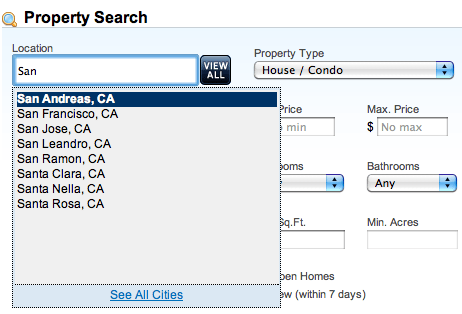
Locations can be selected with a click of the mouse, or by using the arrow and Enter keys. Multiple locations can be added in this way, making it fast and simple to create a search or email updates that will find them the properties they want. Try it out on our demo site!
It’s still possible to view all available cities with the City Selector, which can be accessed through the View All button or the link at the bottom of the auto-suggest box.
Learn more about iHomefinder’s powerful IDX search for Optima IDX.

Leave a Reply
Want to join the discussion?Feel free to contribute!