
[av_heading heading=’Available now! Grid view for listings results.’ tag=’h3′ color=” custom_font=” style=’blockquote modern-quote’ size=” subheading_active=” subheading_size=’15’ padding=’10’ av_uid=’av-27bqc9h’][/av_heading]
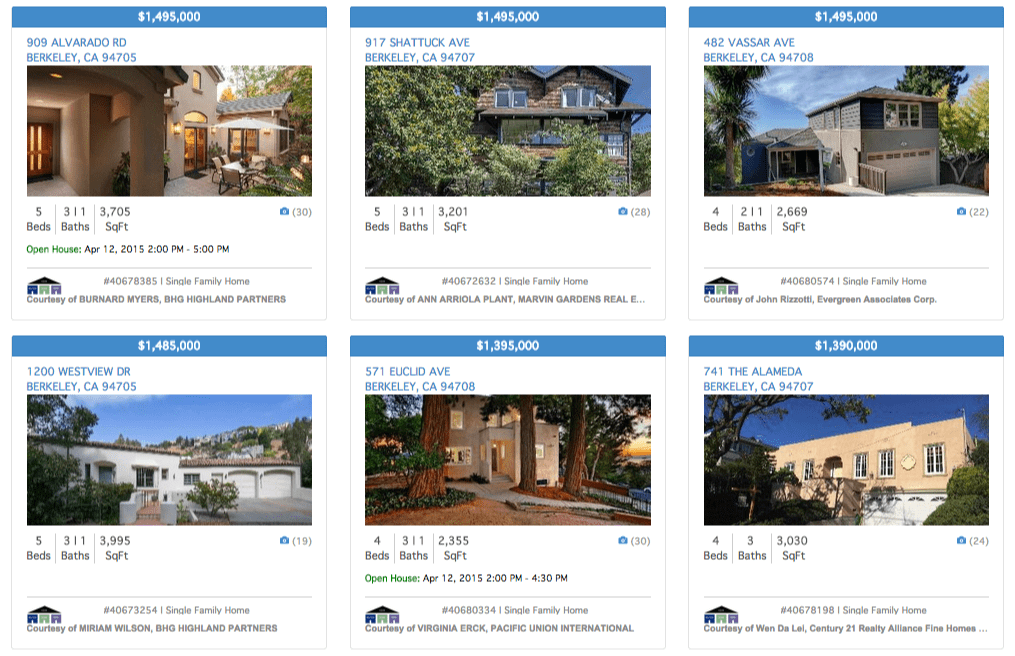
This attractive, modern design works on all devices and screen sizes. Just one setting in your Control Panel will enable the grid view throughout your site on:
- Search results pages
- Markets/Saved Search pages
- Featured Listings pages
You can also change the number of results displayed per page, and show or hide the map.
[av_heading heading=’Try it Out’ tag=’h3′ color=” custom_font=” style=’blockquote modern-quote’ size=” subheading_active=” subheading_size=’15’ padding=’5′ av_uid=’av-1iws3w5′][/av_heading]
It’s easy! Learn how to enable the grid view option >>
[av_heading heading=’WordPress Listing Galleries’ tag=’h3′ color=” custom_font=” style=’blockquote modern-quote’ size=” subheading_active=” subheading_size=’15’ padding=’5′ av_uid=’av-4bgz85′][/av_heading]Listing Galleries in Optima Express and OmniPress websites will use the display setting you select in your Control Panel. If you choose, you can override the default setting for any individual Listing Gallery. Learn how >>
[av_heading heading=’Optima Express Plugin Update’ tag=’h3′ color=” custom_font=” style=’blockquote modern-quote’ size=” subheading_active=” subheading_size=’15’ padding=’5′ av_uid=’av-kgdm5x’][/av_heading]If you’re using Optima Express, you’ll need to update the Optima Express plugin to version 2.6.0 or higher to acess these new features.