

Here’s something most agents have never done. Ask ChatGPT about themselves.
Not “Chat, write me a listing description.” Not “Give me five Instagram captions.” Ask it the questions a buyer or seller might ask when they’re deciding who to work with.
- Who are the best real estate agents in [city]?
- Who should I talk to if I’m relocating there?
- Tell me about [your name].
You might show up. You might not. And if you do, what it says about you might not be what you expect. That’s worth having on your radar.
In the last post, we covered the five pages you can add to your real estate website to give AI better information to work with. Before you start building those, let’s spend 20 minutes finding out what AI already knows about you.
Here’s the audit you can use starting today to learn how to check what AI says about your business.
Open three tabs
Go to ChatGPT, Gemini, and Perplexity. Make sure you’re logged out of each platform before you start. This helps prevent your past conversations and saved preferences from influencing the answers.
Run the same eight prompts in all three. Don’t rewrite the question because you don’t like the first answer. Don’t add a paragraph of context to help the tool find you. Instead, keep it simple.
We’re trying to get reasonably close to what a buyer or seller might see when they ask the same thing. And screenshot every answer. You’ll want the baseline later.
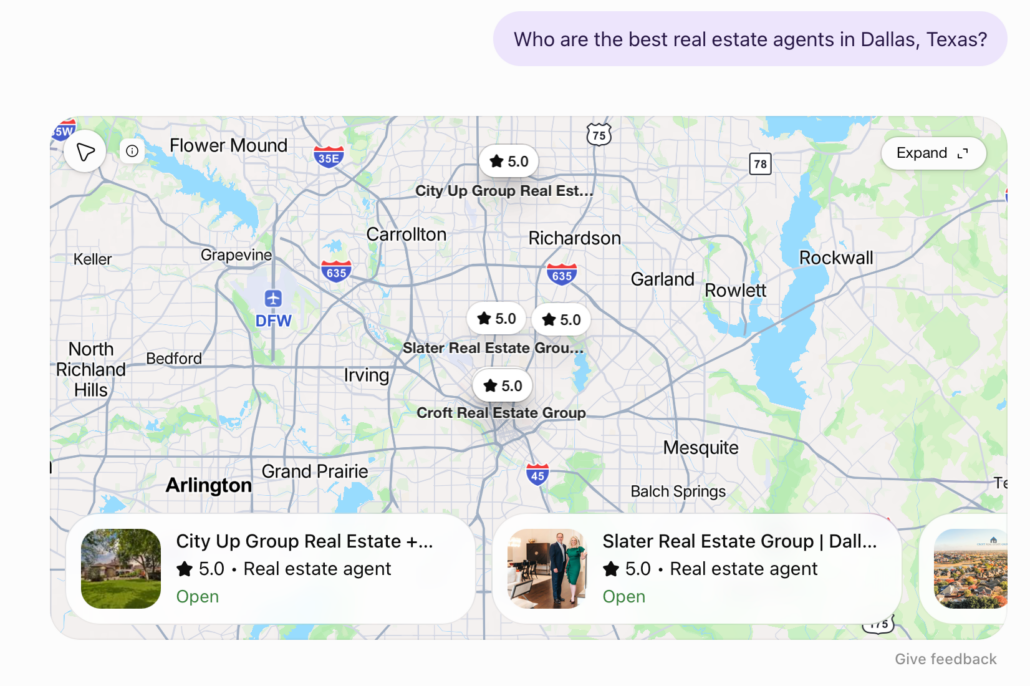
1. “Who are the best real estate agents in [city]?”
Start broad. Did you show up? If not, who did?
Now look one level deeper. What does the answer say about the agents it chose, and where did that information come from?
You may see directories, brokerage websites, agent roundups, review sites, or individual agent pages. Pay particular attention to anything that appears more than once.
You’re not trying to reverse-engineer an AI ranking system from one search. You’re looking for patterns in who gets mentioned, how they’re described, and which pages give AI something useful to work with.
2. “I’m relocating to [city] — who should I talk to?”
Now, give it a specific client. The recommendations may change—which is where things can get interesting.
Look at why an agent appears to fit the question. Does the answer mention relocation experience? Out-of-state buyers? A specific service area? Does it point to a relocation page or another source that backs that up?
If relocation is a big part of your business but nothing online makes that obvious, you’ve found something to work on.
That’s different from simply not ranking first. The issue is whether the information exists for AI (or a buyer) to connect you with that need in the first place.
3. “What’s the best real estate agent in [city] for first-time buyers?”
Now you’ll do the same exercise but switch up the context for a different client.
Who appears, and what makes them look like a fit?
Maybe another agent has a dedicated first-time buyer page. Maybe their bio specifically mentions that work. Maybe their reviews or third-party profiles keep connecting their name with first-time buyers.
Take a closer look at what supports those recommendations.
You may find that other agents have information online that makes their experience with first-time buyers easier to understand. That can help you spot what’s missing from your own site.
And if first-time buyers aren’t a focus for your business, that’s useful context too. Not every prompt has to point back to you for you to see results.
4. “Tell me about [your name], real estate agent in [city].”
This is one of our favorite AI prompts. Because now you’re not asking AI to choose you. You’re asking what it thinks it knows about you.
Read the answer like you’ve never heard of yourself.
Is your brokerage right? Does it know where you work? Does it mention your actual specialties? Are your experience, credentials, and other details current?
And what’s missing? An answer can be technically accurate and still tell a pretty incomplete story.
If you’ve spent 15 years working in a particular market and the answer says only that you’re “a real estate professional serving the area,” that’s useful information from this audit too.
Then check the sources. If something is flat-out wrong, there’s a decent chance the old information is still sitting somewhere online.
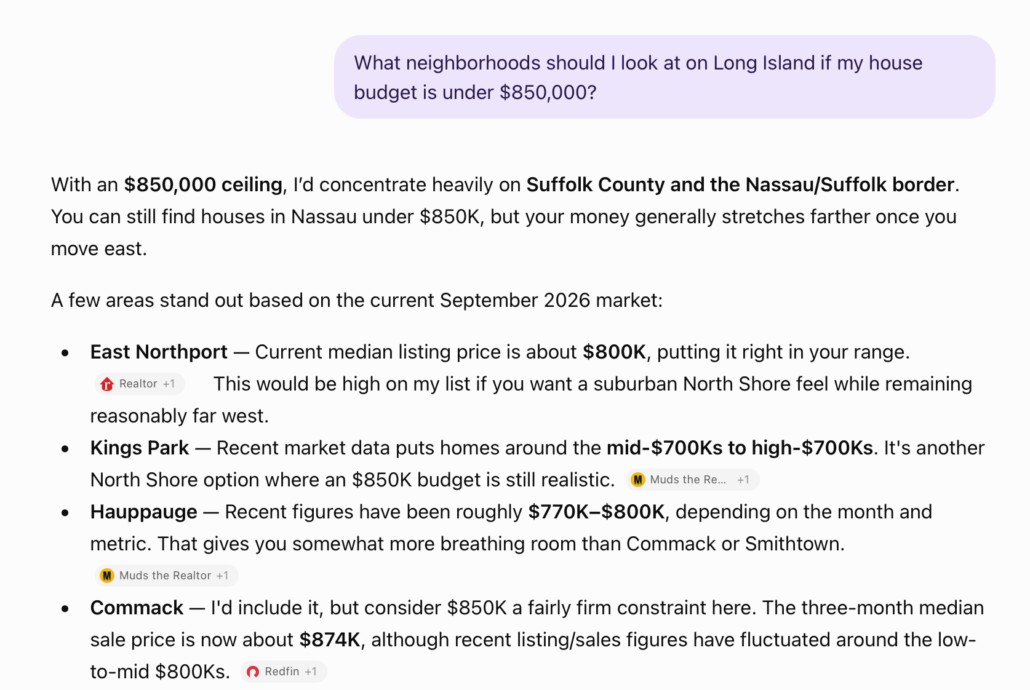
5. “What neighborhoods should I look at in [city] if [situation]?”
Make this one specific to the kind of decision a buyer might actually be making. For example:
“What neighborhoods should I look at in [city] if I want an older home and a commute under 25 minutes?”
Or:
“Where should I look in [city] with a $500,000 budget if I want a bigger yard?”
Now see what AI does with it. Which neighborhoods come up? What sources support the answer? Does any agent-created content appear?
Then, check the facts.
If the answer describes a neighborhood as a $500,000 option but current inventory tells a very different story, write that down. You just found an information gap a current, useful neighborhood page could fill.
6. “Compare real estate agents in [city].”
This one tells you what AI has available to tell agents apart. Read the descriptions.
One agent may be associated with luxury. Another with relocation. Another with a particular neighborhood, property type, or kind of buyer. Now look at yours.
Could someone easily figure out what makes your business different from the other agents on the list?
If your description sounds overly general, look for opportunities to make it more specific.
Broad phrases like “dedicated to helping clients achieve their real estate goals” or “local market expert” don’t say much about the work you actually do.
Details about your specialties, experience, service areas, and the clients you typically work with give both people and AI a clearer picture of your business.
7. “I’m selling my house in [neighborhood] — how should I pick an agent?”
This prompt gives you a slightly different perspective.
Instead of focusing only on which agents appear, look at the factors AI suggests a seller should consider when choosing one.
Recent neighborhood sales? Pricing experience? Marketing strategy? Reviews? Knowledge of that specific part of town?
Now turn the question back on your own website. If AI tells a seller to look for neighborhood experience, can they find evidence of yours?
If it says to compare marketing strategies, have you explained yours anywhere?
This prompt gives you a pretty good checklist of what a seller may want to know before they ever contact you.
8. “What should I know before buying in [city]?”
Here’s the last prompt you can use to put AI’s knowledge to the test. This time, we’re looking at what AI thinks it knows about your market.
Check the numbers. Check the market descriptions. Check the sources.
What’s current? What’s generic? What’s out of date?
Big picture: If AI is giving buyers stale numbers or inaccurate information about your market, you’ve just found your next website update. Build or refresh a neighborhood or market page that fills in the gaps with current data, local context, and the details AI missed. Maybe it’s outdated home prices, a misleading description of the local market, or important information about a neighborhood that never came up.
Whatever the gap, use it to guide what you publish next. You’re not just correcting bad information. You’re creating a better resource for buyers and sellers while giving AI more accurate, useful information to reference in future answers.
Now score your AI visibility
At this point, you have 24 answers: eight prompts across three AI tools.
What’s next? Compare them. You don’t need a complicated scoring system. Use the five questions below to record what you found, spot patterns across the answers, and identify the biggest gaps to work on.
| Question | Notes to Track |
| Did you appear? | Which prompts and tools mentioned you? |
| Who appeared instead? | Which agents showed up repeatedly? |
| Where did the information come from? | Note the pages and sources used in the answers. |
| Was your information right? | Flag anything missing, stale, or wrong. |
| Did your website appear? | Note which of your pages were surfaced or cited. |
That’s your scorecard.
Don’t obsess over one answer. AI responses can change by tool, wording, available sources, and when you run the prompt.
You’re looking for patterns.
And you’ll probably find one of these three:
You don’t exist (when it comes to AI)
Not literally. But for the questions you’re testing, AI has very little to work with.
Maybe your website has listings, an About page, and a contact form—but nothing that clearly explains who you help, where you work, or what you’re especially good at.
That’s where the [five pages from the last post] come in: agent roundups, neighborhood comparisons, relocation content, service pages, and an About page built around actual facts.
Don’t build all five tomorrow.
Start with the biggest hole your audit just exposed.
You exist, but your content is thin
AI finds you. It knows you’re an agent. It knows your brokerage. But that’s about it.
Usually, your About page is the first place I’d look.
If you’ve been selling in the same market for 14 years, say it. If relocation makes up a big part of your business, say that. If you specialize in new construction, first-time buyers, or a particular part of town, put it in plain text.
The goal isn’t to stuff your bio with keywords.
It’s to stop making people—and AI—guess what you’re actually good at.
AI’s got you all wrong
Old brokerage. Old market. Wrong specialty.
Maybe it’s a bio you wrote years ago that’s still sitting on a directory you haven’t thought about in a while.
If something looks wrong, start by checking the sources behind the answer. Outdated information on your own website is easy to correct. If it’s coming from a directory or another profile you can manage, it’s worth updating there too.
You can also search your name alongside the incorrect information to see where else it appears. The same outdated details may be showing up in more than one place.
Learn how to check what AI says about your business: Steps to take this week
Set a timer for 20 minutes. Run all eight prompts in ChatGPT, Gemini, and Perplexity. Screenshot the answers and fill out the scorecard.
Now, before you start rewriting your entire website, look for the biggest gap. Did all three tools leave you off a list of local agents? Did one recommend you but get your service area wrong? Did they pull outdated information about your market?
Start with the problem that showed up most often, then make one targeted update:
- Missing from local agent recommendations? Review your About page and make sure it clearly states who you serve, where you work, and what makes your experience relevant.
- Incorrect service areas or specialties? Update your website’s key pages so your location, services, and expertise are consistent and easy to find.
- Outdated or generic market information? Refresh a neighborhood or market page with current data, specific local insights, and answers to questions buyers actually ask.
That’s your assignment for the week. One problem, one update. You don’t need to solve everything the audit uncovered.
Save your screenshots and run the same eight prompts again in 90 days. The individual answers will move around. That’s expected, and one website update won’t guarantee a different result.
What you’re looking for is simpler: Does AI have better information about who you are, where you work, and what you actually do?
Take the next steps
Getting recommended by AI is a great start. But what happens when a buyer or seller clicks through to your website? If they can’t find useful information, explore available homes, or figure out how to work with you, that recommendation won’t get you very far.
That’s why the work doesn’t stop with better About pages, updated market information, or clearer descriptions of your expertise. Your website also needs to give visitors a reason to stick around. Think searchable listings, neighborhood-specific property searches, saved searches, and listing alerts that keep buyers connected to your business long after their first visit.
iHomefinder helps you build that next step into your website with IDX property search, lead capture tools, automated listing alerts, and features designed to turn website visitors into ongoing relationships.
So when someone discovers you through ChatGPT or Gemini, they don’t just learn your name. They have a place to explore homes, share what they’re looking for, and take the next step with you.
The goal is to turn that AI introduction into a relationship that lasts.